Self Customer Service: Making Support Better with Video Solutions

Discover practical tips to enhance self-service customer support and boost satisfaction. Learn effective solutions to empower your customers today!
Customers today want fast, simple ways to fix their problems. Self customer service has become a key way for businesses to meet these needs while cutting down on support costs. But how can companies make their self-service options better? Video technology offers a game-changing answer.
What Is Self Customer Service?
Self customer service includes the tools that help customers find answers and fix problems on their own, without talking to a company rep. These DIY options let customers troubleshoot issues and find info whenever they want, day or night.
The usual customer self service channels include:
Knowledge bases and help centers with how-to articles and FAQs
Customer portals where people can manage their accounts and see their own info
Community forums where customers help each other out
Chatbots and virtual assistants that walk users through common problems
These channels work okay, but they mostly rely on text. That creates headaches when customers try to explain tricky issues or show what’s wrong with physical products.

Why Self-Service Matters: Real Numbers Tell the Story
Let’s look at why building good customer self service options matters so much for today’s businesses:
What customers want: About 61% of customers would rather use self-service for basic issues instead of calling support
Getting more done: Companies with good self-service fix about 54% of customer problems this way
Saving money: A self-service transaction costs roughly $0.10, while a live support interaction costs $8-$15
Freeing up your team: When customers handle simple stuff themselves, your support folks can tackle the hard problems that need human know-how
These stats show why companies in all industries are making self-service a big part of their customer experience plans. But not all self-service options work equally well.
How Self Customer Service Has Changed
Self-service has gone through big changes over the years:
First Wave: Basic Content
Early self-service was mostly FAQs and simple help articles—static content that customers had to dig through to find answers.
Second Wave: Interactive Help
Next came interactive tools like decision trees, step-by-step guides, and chatbots that gave more personal help.
Third Wave: AI Help
In recent years, AI-powered self-service has grown, with smart suggestions and natural language tools making things easier to use.
Today's Wave: Video-Powered Self-Service
The newest change brings in video technology to create visual, hands-on self-service experiences that really boost fix rates and make customers happier.
What's Wrong With Old-School Self-Service
Even with their good points, traditional self-service channels face big challenges:
Hard to explain things: Text instructions can be tough to follow, especially for visual or technical issues
Missing the full picture: Customers struggle to describe their problems clearly, leading to confusion
Too complicated: Some issues just don’t work with text alone, forcing customers to call support anyway
Feels cold: Traditional self-service often seems robotic, missing the human touch customers value
These problems explain why, even after spending money on self service support, many businesses still get flooded with support tickets and calls.
Key Channels for Self Service
Automated chatbots and AI agents
Automated chatbots and AI agents are revolutionizing self-service customer support by providing instant answers to customer inquiries. These intelligent tools leverage artificial intelligence to understand and respond to customer questions, offering support around the clock. Integrated into websites, mobile apps, and messaging platforms, they ensure that customers receive timely assistance without the need for human intervention.
The benefits of automated chatbots and AI agents are numerous:
Instant answers: Customers get immediate responses to their questions, enhancing their experience.
Reduced workload: By handling routine inquiries, chatbots free up your human support team to focus on more complex issues.
Improved response times: With 24/7 availability, customers no longer have to wait for business hours to get help.
Increased customer satisfaction: Quick and efficient support leads to happier customers.
Cost-effective: Automating support reduces the need for a large support team, cutting down on operational costs.
By incorporating automated chatbots and AI agents into your self-service strategy, you can provide efficient, round-the-clock support that meets customer expectations.
Knowledge base
A knowledge base is a powerful self-service tool that offers customers instant access to a wealth of information. This centralized repository includes articles, tutorials, guides, and FAQs that cover various aspects of your product or service. A well-organized knowledge base allows customers to find answers quickly and easily, reducing their reliance on human support.
The advantages of a knowledge base include:
Instant access to information: Customers can find answers to their questions at any time, without waiting for support.
Reduced need for human support: By providing comprehensive information, a knowledge base decreases the volume of support tickets.
Improved customer satisfaction: Quick access to accurate information enhances the customer experience.
Cost-effective: Maintaining a knowledge base is more affordable than hiring additional support staff.
Easy to update and maintain: Regular updates ensure that the information remains current and relevant.
Implementing a robust knowledge base as part of your self-service strategy can significantly improve customer satisfaction and reduce support costs.
Community page
A community page is an invaluable self-service resource that fosters customer engagement and collaboration. This platform includes forums, discussion boards, and social media groups where customers can connect, ask questions, share tips, and discuss topics related to your product or service. By leveraging the collective knowledge of your customer base, a community page can provide support and insights that go beyond what your support team can offer.
The benefits of community pages are:
Customer engagement and loyalty: Active participation in a community builds a sense of belonging and loyalty among customers.
Reduced need for human support: Customers often find answers from their peers, decreasing the demand on your support team.
Improved customer satisfaction: Engaging with a community of users enhances the overall customer experience.
Cost-effective: Community-driven support is a low-cost way to provide assistance.
Valuable customer feedback and insights: Discussions within the community can offer valuable insights into customer needs and preferences.
By creating and nurturing a community page, you can empower your customers to support each other, leading to higher satisfaction and reduced support costs.
How Video Makes Self Customer Service Better
Video fixes these problems by adding visual context and a human element to self-service. Here's how video is changing self customer service:
Showing Problems Clearly
When customers can show instead of just tell, fixing issues becomes much faster. Video lets:
Customers demonstrate issues: They can record and share videos showing exactly what’s happening
Your customer service team can give visual help: Your team can create step-by-step video guides for common problems
Product demos come alive: Videos can show customers how to use features or do maintenance
Flexible Communication
Unlike live video calls, recorded video messages offer flexibility without losing clarity:
Convenient for everyone: Customers can record issues whenever works for them, ensuring they can gain access to support at their convenience
Better use of time: Support agents can watch videos and reply when they’re free
Better records: Video exchanges create a visual history of issues and solutions
AI-Boosted Video Help
Mixing video with AI creates powerful new abilities:
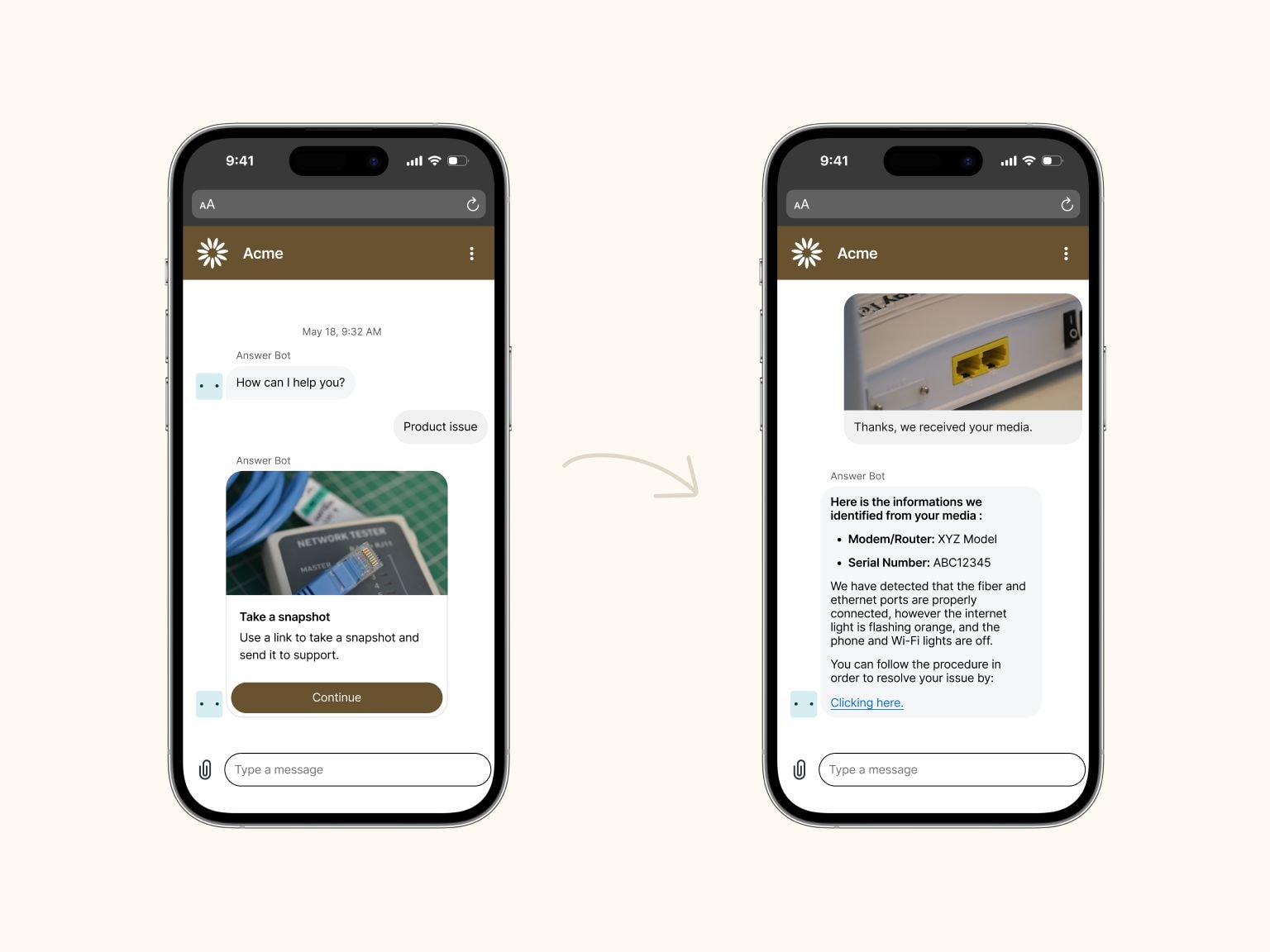
Automatic problem spotting: AI can look at customer videos to identify products, error codes, and common issues
Smart ticket handling: Videos can be sorted and sent to the right team automatically
Finding answers faster: Based on what's in the video, AI can suggest helpful resources
Setting Up Video-Powered Self-Service: How SnapCall Does It
SnapCall's solution works smoothly with your existing customer service systems to enable video-powered self-service:
For Your Customers
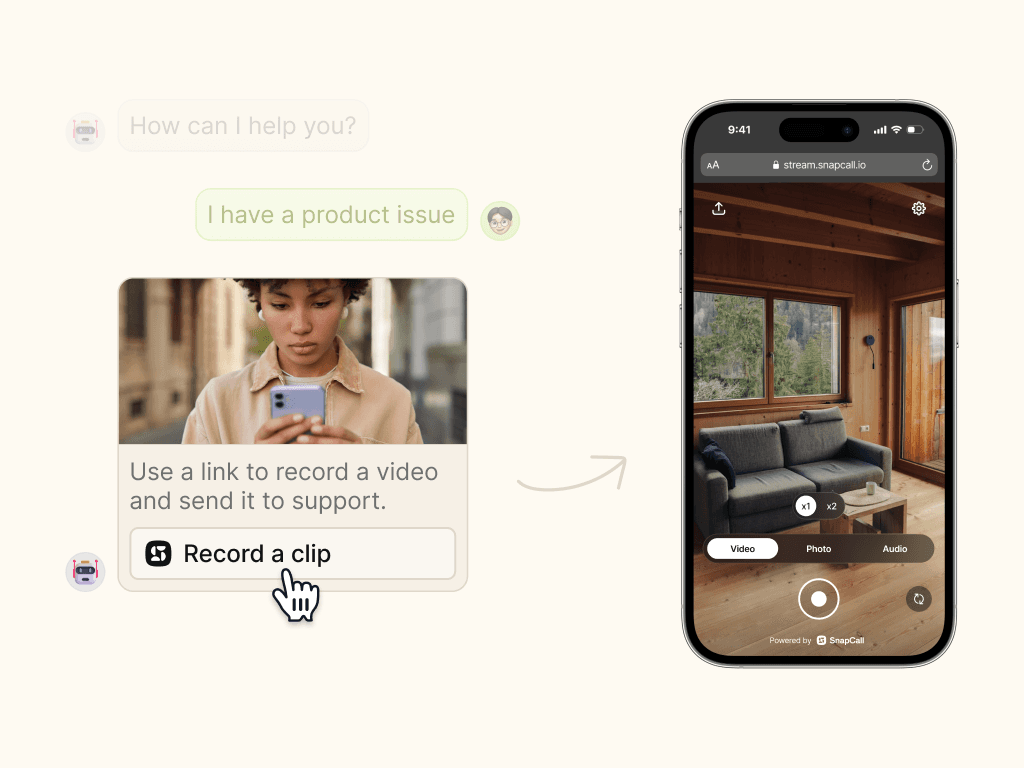
With SnapCall Clip, customers can:
Record videos showing their issues with just one click
Take photos of products, error messages, or settings
Share screen recordings to show software problems
Do all this without downloading any apps
For Your Support Teams
On your business side, support teams can:
Watch customer videos to understand issues exactly
Make and share how-to videos to empower customers to find solutions independently
Build a searchable library of video solutions
Connect video features with existing CRM systems
Use AI to analyze videos for faster problem-solving
Real Success Stories
Devialet: Audio Equipment Company
Devialet started using SnapCall's video self-service to help customers fix their high-end audio devices:
46% faster resolution for technical issues
Fewer home visits needed by letting techs see problems remotely
Happier customers thanks to clearer communication
Tips for Better Video-Based Self Customer Service
To get the most from video in your self-service plan:
Start with common issues: Find the support requests you get most often and create video solutions for these first
Keep videos brief: Aim for 60-90 seconds per topic to keep viewers interested
Mix video with text: Add written summaries alongside videos for customers who prefer reading
Make sure it works on phones: Ensure customers can record and watch videos easily on mobile devices
Check how it's working: Keep track of completion rates, successful fixes, and customer feedback
Help your team learn: Make sure support agents feel comfortable creating and analyzing video content
Linking Video Self-Service to Your CRM
For the best experience, your video self-service should connect with your customer relationship management (CRM) system. This connection gives several benefits:
See the whole customer story: Agents can view a customer's complete history, including past videos
Keep experiences the same: Information gathered through video self-service works across all support channels
Personalize service: Data from video interactions helps tailor future self-service suggestions
Better reporting: Track how well video self-service works alongside other support metrics
Checking If Your Video Self-Service Works
To see how well your video-powered self customer service is doing, watch these key numbers:
Case deflection rate: What percentage of potential support cases get fixed through self-service
First-time fix rate: Whether issues get solved on the first try
Time to resolution: How quickly issues get fixed compared to old methods
Customer happiness: CSAT or NPS scores for video-helped resolutions
Support costs: How much less each resolution costs after adding video self-service
What's Next for Self Customer Service
Looking ahead, we see several new trends coming in video-powered self-service:
AR guidance: Visual overlays that guide customers through physical repairs or setup
Live AI feedback: Instant analysis of customer videos to suggest solutions right away
Mood detection: Seeing how frustrated customers are to prioritize and personalize responses
Videos before problems happen: Using product usage data to suggest relevant how-to videos before issues come up
Wrapping Up: Better Self-Service Through Visual Help
Self customer service remains a vital part of modern support strategies, with huge potential for saving money and making customers happier. By adding video technology, businesses can overcome the limits of text-based self-service, providing clearer, more effective help.
As customer expectations keep rising, the companies that succeed will be those that try new approaches to self-service. Video-powered solutions represent the next big step, combining the efficiency of self-service with the clarity and personal touch of visual communication.
Whether you're just starting with self-service or looking to improve what you already have, adding video will help you deliver experiences that truly meet your customers' needs—while cutting support costs and building stronger customer relationships.
Want to make your self customer service better with video technology? Find out how SnapCall can help you set up video-powered solutions that please customers and lower support costs.
[CTA] Book a demo today to see how SnapCall's video technology can improve your self-service strategy and boost customer satisfaction.
Frequently Asked Questions About Self Customer Service
What is a customer self-service portal?
A customer self-service portal is a dedicated online space where customers can access account information, find answers to common questions, submit and track support tickets, and handle basic service tasks without contacting a support agent. Modern self-service portals often include video support options, allowing customers to record their issues or watch solution videos.
How does self customer service reduce support costs?
Self customer service cuts costs in several ways. First, it lowers the number of tickets reaching your support team. Second, when customers do need help, agents spend less time figuring out the problem. For example, video-based self-service can reduce case handling time by up to 40%. Third, self-service works 24/7, reducing the need for round-the-clock staffing.
What's the difference between self-service and customer self-service?
There's no real difference - both terms refer to systems that let customers find answers and solve problems on their own. Some companies use "customer self-service" to emphasize the customer-centric approach of their tools. What matters most is offering multiple self-help options: knowledge bases, video guides, chatbots, and customer forums.
What are the best customer self-service tools in 2025?
The best self customer service tools now include video capabilities, while also ensuring that phone support is available for more complex issues. Top-rated options include SnapCall for video-based support, Zendesk for comprehensive help centers, Intercom for chatbots, and Salesforce Experience Cloud for customer portals. The most effective tools integrate with your CRM and offer AI features to make self-service smarter.
How do I build a self-service customer support strategy?
Start by analyzing your most common support tickets to identify which issues could be resolved through self-service. Create clear documentation, especially video tutorials, for these issues. Make your self-service options easy to find on your website and in your app. Track usage metrics and customer feedback to refine your strategy over time.
How do video clips improve customer self-service?
Video clips, as a form of self service content, show exactly what’s happening with a product, eliminating confusion from text descriptions. For customers, recording a quick video is easier than writing a detailed explanation. For agents, seeing the issue speeds up diagnosis by 46%. Video self-service also builds trust by adding a human element to digital support interactions.
Is self customer service suitable for mobile users?
Absolutely! In fact, 76% of customers now use mobile devices to seek support. Modern video-based self-service platforms like SnapCall are fully mobile-optimized, letting customers record and send videos right from their phones. Mobile-friendly self-service is essential for reaching customers wherever they are.
How does AI enhance self customer service options?
AI makes self service customer service smarter in several ways. It can analyze customer videos to identify products and common issues automatically. AI chatbots can guide customers to relevant self-service resources based on their questions. AI also helps personalize the self-service experience by recommending content based on the customer’s history and needs.
What industries benefit most from self customer service?
While all industries gain from self-service, tech companies, retailers, manufacturers, financial services, and telecom providers see the biggest impact. For products with visual components or complex setup processes, video-based self customer service is particularly valuable, reducing returns and support calls by up to 30%.
How does self customer service affect customer satisfaction?
When done right, self-service boosts satisfaction by 20% on average. Customers appreciate getting answers immediately without waiting for agent responses. Video self-service adds clarity that text alone can't provide. The key is making self-service easy to use and ensuring it actually solves problems rather than creating frustration.
Can self customer service work with voice assistants?
Yes! Integrating self-service with voice assistants like Alexa, Google Assistant, or Siri is an emerging trend. Customers can ask voice assistants questions about your products, and these systems can direct them to video self-service options when visual help would be beneficial. This creates a seamless omnichannel self-service experience.
How do I measure ROI from self customer service investments?
Calculate ROI by tracking: (1) reduction in support tickets, (2) decreased average handling time, (3) lower cost per resolution, (4) improved customer satisfaction, and (5) increased customer retention. Companies typically see ROI within 3-6 months after implementing video-based self customer service, with cost savings of 25-40%.
What's the relationship between self customer service and knowledge management?
Knowledge management provides the foundation for effective self-service. Your knowledge base articles, video tutorials, and solution guides become the content customers access through self-service channels. Video adds a powerful dimension to knowledge management, making complex information easier to understand and apply.
How do you implement self customer service without frustrating customers?
Always offer a clear path to human help when self-service isn't working. Use analytics to identify where customers abandon self-service attempts. Create short, focused video content rather than long, complex guides. Test your self-service tools with real customers before full deployment. And continuously improve based on feedback and usage patterns.
Can small businesses benefit from video-based self customer service?
Definitely! Small businesses often have limited support staff, making self-service even more valuable. Video-based platforms like SnapCall offer affordable options that scale with your business. Small companies typically see support requests drop by 25% after implementing video self-service, allowing their limited team to focus on complex issues.