How to Integrate Video Chat into Your Customer Support: A Step-by-Step Guide

Learn how to integrate video chat into your customer support with this comprehensive guide. Discover step-by-step implementation tips, best practices, and real success stories showing how video support reduces resolution time by up to 46%.
Table of Contents
Introduction
Why Video Chat is Revolutionizing Customer Support
Key Benefits of Integrating Video Chat
Step-by-Step Guide to Integrating Video Chat
Best Practices for Successful Video Chat Support
Real-World Success Stories
Measuring the Impact of Video Support
Frequently Asked Questions
Conclusion
Introduction
In today's experience-driven economy, customer support is no longer just about solving problems—it's about creating meaningful connections that build trust and loyalty. Yet traditional support channels often fall short in delivering the personal touch that modern customers crave. Text-based interactions miss crucial non-verbal cues, while phone support lacks visual context that can make resolution faster and more efficient.
Enter video chat support: a game-changing approach that's transforming how businesses connect with customers. By bringing face-to-face interactions into the digital realm, companies can deliver more human, effective, and memorable support experiences—all while improving operational efficiency.
In this comprehensive guide, we'll walk you through everything you need to know about integrating video chat into your customer support strategy, from understanding the core benefits to implementing a solution like SnapCall that seamlessly fits into your existing tech stack.
Why video chat is revolutionizing customer support
Traditional support channels have significant limitations that impact both customer satisfaction and operational efficiency:
Phone calls rely solely on verbal communication, making complex issues harder to explain and understand
Email and chat lack real-time interaction and visual context, leading to longer resolution times
Text-based communication misses non-verbal cues that are essential for building rapport and trust
Video chat bridges these gaps by combining the convenience of digital channels with the richness of face-to-face interaction. When a customer can show rather than tell what's happening, support agents can diagnose issues faster and provide more accurate solutions.
According to industry research, video support can reduce resolution times by up to 46% while increasing customer satisfaction scores by 15% or more. These impressive results explain why forward-thinking companies across industries—from retail and e-commerce to healthcare and financial services—are rapidly adopting video chat as a core support channel.
Key benefits of integrating video chat into your support strategy
1. Enhanced problem resolution
With video chat, customers can visually demonstrate issues rather than struggling to describe them. This visual context helps support agents understand problems more accurately and resolve them faster. Whether it's troubleshooting a product malfunction, guiding through software setup, or explaining how to use a complex feature, video makes the process more efficient and effective.
2. Stronger customer connections
Video interactions add a human element that text or voice alone can't match. Seeing facial expressions and body language helps build rapport and trust, making customers feel more valued. This personal connection can turn a potentially frustrating support experience into a positive brand touchpoint that strengthens customer loyalty.
3. Reduced resolution times
With the ability to see and show rather than just tell, support issues that might take multiple back-and-forth messages can often be resolved in a single video interaction. This efficiency translates directly to cost savings and improved customer satisfaction through faster resolution times.
4. Improved first-contact resolution rates
Video support enables agents to gather more information in less time, significantly increasing the chances of resolving issues on the first contact. This reduces the need for follow-up interactions and prevents customer frustration from escalating problems.
5. Valuable customer insights
Video interactions provide rich qualitative data about how customers use your products, common pain points, and opportunities for improvement. These insights can inform product development, marketing strategies, and training programs for support teams.
Step-by-step guide to integrating video chat
1. Assess your current support infrastructure
Before implementing video chat, evaluate your existing support channels, technology stack, and team capabilities:
Which CRM or helpdesk system are you currently using?
What are your most common customer support scenarios?
Does your team have the necessary skills and training for video interactions?
What are your specific goals for implementing video support?
2. Choose the right video chat solution
Look for a solution that offers:
Seamless integration with your existing CRM or helpdesk system
No-download experience for customers (browser-based)
Flexible deployment options (scheduled calls, on-demand video, asynchronous video messaging)
Security and compliance features to protect customer data
Analytics capabilities to measure performance and ROI
SnapCall stands out by offering native integration with popular platforms like Zendesk, Salesforce, and Intercom, along with powerful AI features that can automatically summarize video interactions and extract valuable insights.
3. Configure your integration
Setting up SnapCall with your existing support systems is straightforward:
Install the SnapCall app from your CRM's marketplace
Configure API connections following the step-by-step instructions
Set up user permissions and access controls
Customize the video chat interface to match your brand
4. Train your support team
Prepare your team for video interactions with training on:
Technical aspects of using the video platform
Best practices for visual communication
How to guide customers through showing their issues
Professional appearance and environment setup
Troubleshooting common video connection issues
5. Create clear workflows and escalation paths
Establish processes for:
When to offer video chat as an option
How to transition from text or voice to video
Steps for documenting video interactions
When and how to escalate complex issues
Follow-up procedures after video sessions
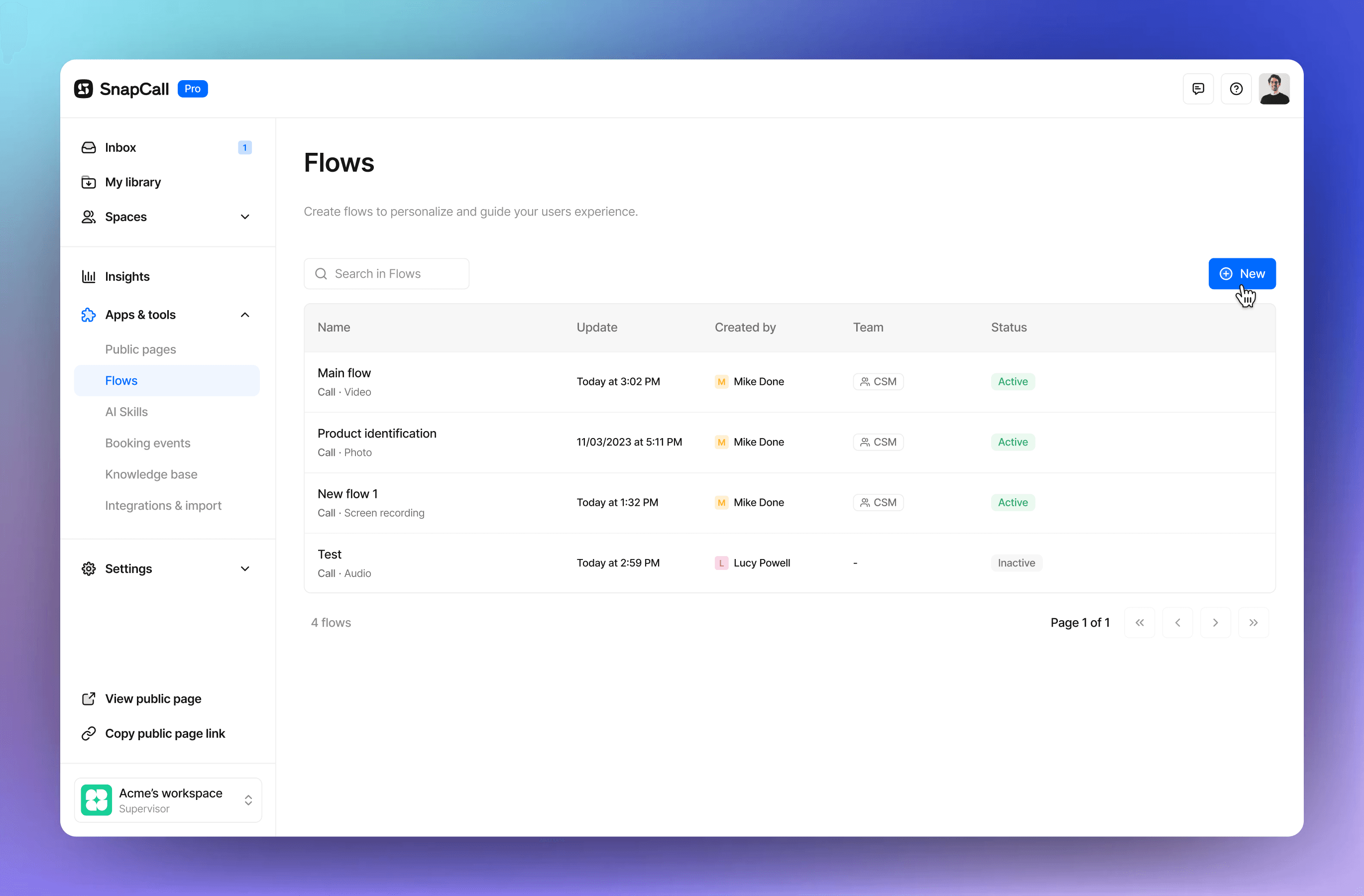
6. Launch a pilot program
Start with a small-scale implementation:
Select a specific customer segment or support scenario
Train a dedicated team for the pilot
Collect detailed feedback from both customers and agents
Measure key metrics against your baseline
Refine processes based on initial results
7. Scale and optimize
After successful pilot testing:
Expand to more customer segments and support scenarios
Continue training additional team members
Implement learnings from the pilot
Regularly analyze performance data
Continuously refine your approach
Best practices for successful video chat support
1. Offer options, don't force video
Not every customer will be comfortable with video chat, and not every issue requires visual interaction. Make video an option alongside traditional channels, and let customers choose their preferred communication method.
2. Focus on specific use cases first
Rather than implementing video support across all scenarios, identify specific situations where visual communication adds the most value—like troubleshooting complex products, verifying identity, or providing personalized consultations.
3. Keep the technology simple
The easier it is for customers to join a video session, the more likely they are to use it. Choose a solution like SnapCall that works directly in the browser without requiring downloads, registrations, or complex setup processes.
4. Prepare your environment
Create guidelines for support agents regarding appropriate backgrounds, lighting, audio quality, and professional appearance during video calls. A consistent, professional environment builds credibility and trust.
5. Leverage both synchronous and asynchronous video
Live video calls are valuable for complex issues, but asynchronous video messaging (where customers can record and share videos at their convenience) can be equally powerful for certain scenarios while offering greater flexibility.
Real-world success stories
Devialet: Premium audio manufacturer achieves 46% faster resolution times
Devialet, a luxury audio equipment company, implemented SnapCall to help customers troubleshoot complex product issues. By enabling customers to show their setup through video, support agents could identify problems more accurately and provide targeted solutions. The result: a 46% reduction in resolution times and significantly improved customer satisfaction.
Free PRO: Internet service provider cuts on-site visits by 42%
Free PRO integrated video support to help customers with router and connection issues. By seeing the customer's setup via video, agents could guide them through troubleshooting steps that previously would have required a technician visit. This approach reduced the need for on-site service by 42%, saving costs while providing faster resolution for customers.
Bob's Discount Furniture: Retail chain reduces returns with video verification
By implementing SnapCall's video solution, Bob's Discount Furniture enabled customers to show product issues via video, allowing the company to validate claims faster and provide appropriate solutions without requiring in-home service visits. This approach has saved the company significant costs while improving customer experience.
Measuring the impact of video support
To ensure your video chat integration delivers ROI, track these key metrics:
Average resolution time: Compare resolution times for similar issues addressed via video vs. traditional channels
First-contact resolution rate: Measure how often issues are resolved in a single video interaction
Customer satisfaction scores: Collect feedback specifically for video interactions
Agent efficiency: Track how many tickets agents can handle with video support vs. other channels
Cost per resolution: Calculate the total cost of resolving issues through different channels
Most companies implementing video support see significant improvements across these metrics, with resolution times typically decreasing by 30-45% and customer satisfaction scores increasing by 10-15%.
Frequently asked questions
How much bandwidth does video chat require?
Most modern video chat solutions, including SnapCall, are optimized to work on standard broadband connections. For optimal performance, a minimum upload/download speed of 1-2 Mbps is recommended, though the platform can adjust quality based on available bandwidth.
Will customers need to download an app to use video support?
Not with solutions like SnapCall. Modern video support platforms work directly in the web browser, eliminating the need for customers to download apps or create accounts. This frictionless experience increases adoption rates and customer satisfaction.
How does video chat integration impact agent productivity?
While video interactions might initially take slightly longer than text chats, they typically resolve issues more completely, reducing the need for follow-up contacts. Most companies report that video support actually increases overall agent productivity by 15-20% through higher first-contact resolution rates.
Is video chat secure for sharing sensitive information?
Yes, enterprise-grade video chat solutions employ end-to-end encryption and comply with data protection regulations like GDPR. SnapCall offers TLS 1.2 and AES 256 encryption to keep communications secure.
Can video interactions be recorded for training or quality assurance?
Yes, with proper consent. Solutions like SnapCall include options for recording sessions with customer permission, which can be valuable for training, quality assurance, and documenting complex issues.
Conclusion
Integrating video chat into your customer support strategy isn't just about adding another communication channel—it's about fundamentally transforming how you connect with customers and solve their problems. With the right approach and technology, video support can deliver impressive ROI through faster resolutions, higher customer satisfaction, and valuable operational insights.
The key to success lies in choosing a flexible, user-friendly solution that integrates seamlessly with your existing systems and processes. SnapCall offers exactly that, with native integrations for major CRM platforms, browser-based convenience for customers, and powerful AI features that enhance every interaction.
By following the step-by-step guide and best practices outlined in this article, you can implement video chat support that delights customers while improving your bottom line. The future of customer support is visual, personal, and efficient—and with solutions like SnapCall, that future is accessible to businesses of all sizes today.
Ready to see how video chat can transform your customer support experience? Schedule a demo with SnapCall to get started.